 InvoiceCraft
Invoicing shouldn't be another job.
Send a quote and get it signed on their phone. The invoice, the deposit and the reminders take care of themselves.
14 days free, no card. Just need a free invoice?

Same features on both, nothing capped. Two months free with annual subscription. The invoice generator stays free forever.
Quote to cash in three steps
Describe the job
Type it in plain English or let the AI draft the scope, priced line items, and terms for your trade. Mark the extras optional.
▢ Walk gate, 4 ft (optional) ▢ Stain and seal (optional)
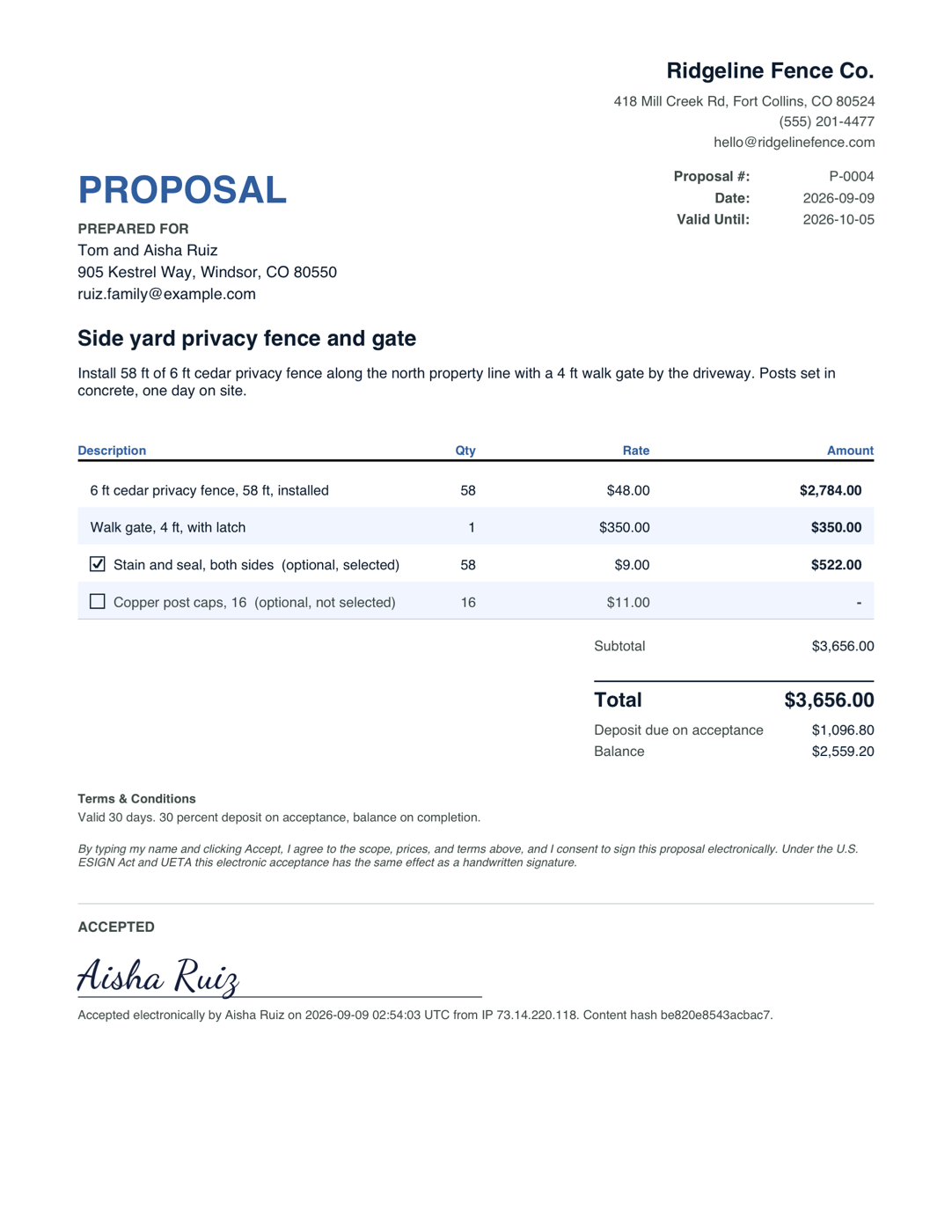
They accept on their phone
One link. They tick the add-ons they want, watch the total update, type their name, and accept. Time, IP, and a content hash are recorded.
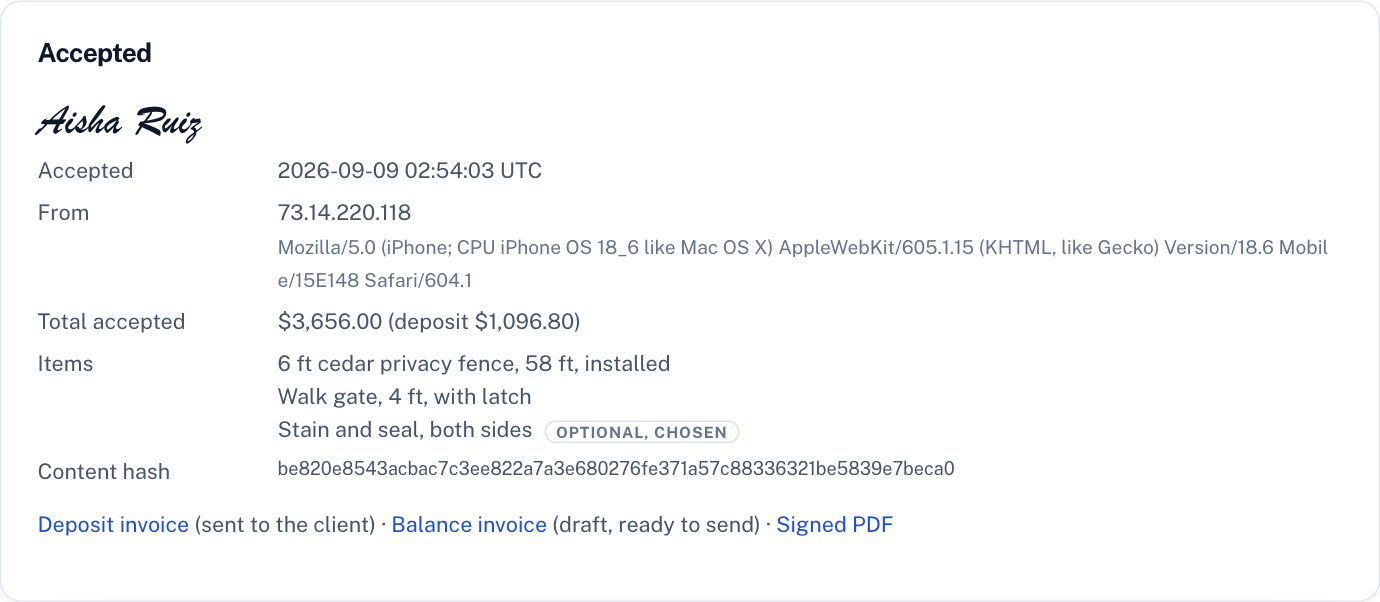
The invoice is already done
Built from exactly what they chose. Set a deposit and the deposit invoice goes out on acceptance; the balance waits as a draft. Receipt when they pay.
Everything a small business needs to get paid
Free invoices need no account and have no limits or watermarks. The trial covers every Pro feature, up to 5 people.
AI writes the invoice
"Replaced water heater, 3 hours labor" becomes priced line items in seconds. Tuned for the trades.
Proposals they accept on a phone
Priced scope, optional add-ons as checkboxes, a typed-name signature, and the invoice written the moment they accept. Three a month free, see how it works.
Get paid by card
Add a free Stripe Payment Link and every invoice gets a Pay online button and QR code. No fees to us, ever.
Everything below, plus unlimited proposals, deposits, and your branding
Start free trial →Send, track & chase
Every send is checked first for a wrong email, a missing price, or a duplicate. Reminders go out before the due date, on the day, and weekly after, a little firmer each time, with replies coming straight to you.
Estimates & recurring
Quote a job, convert to an invoice when it's approved. Repeat work bills itself on schedule.
Receipts & reports
Receipts on payment, income against expenses by month, and QuickBooks and Xero exports your bookkeeper will thank you for.
Part payments & "I've paid"
Record deposits and part payments and the balance due follows the invoice everywhere. Your Zelle, Venmo, or check details print on every invoice, and the customer can tap I've paid. How getting paid works.
Bank deposits, matched
Upload your bank's CSV and deposits are matched to open invoices, even one deposit covering several. No bank login. Bring customers and unpaid invoices over from QuickBooks, Wave, or Square.
Change orders they sign
The job changed? Send a change order the customer approves on their phone. The signed record is permanent and the balance invoice updates itself. See how it works.
Tax package
One zip per quarter or year: a summary of cash received, sales tax by rate and expenses, the spreadsheets, and a PDF of every invoice and receipt. Hand it to your accountant instead of a login.
Warranty tracking
Mark an invoice paid and the coverage dates, the labor and parts you could still owe, and any callback stay with the job. See how it works.
And the rest of the billing
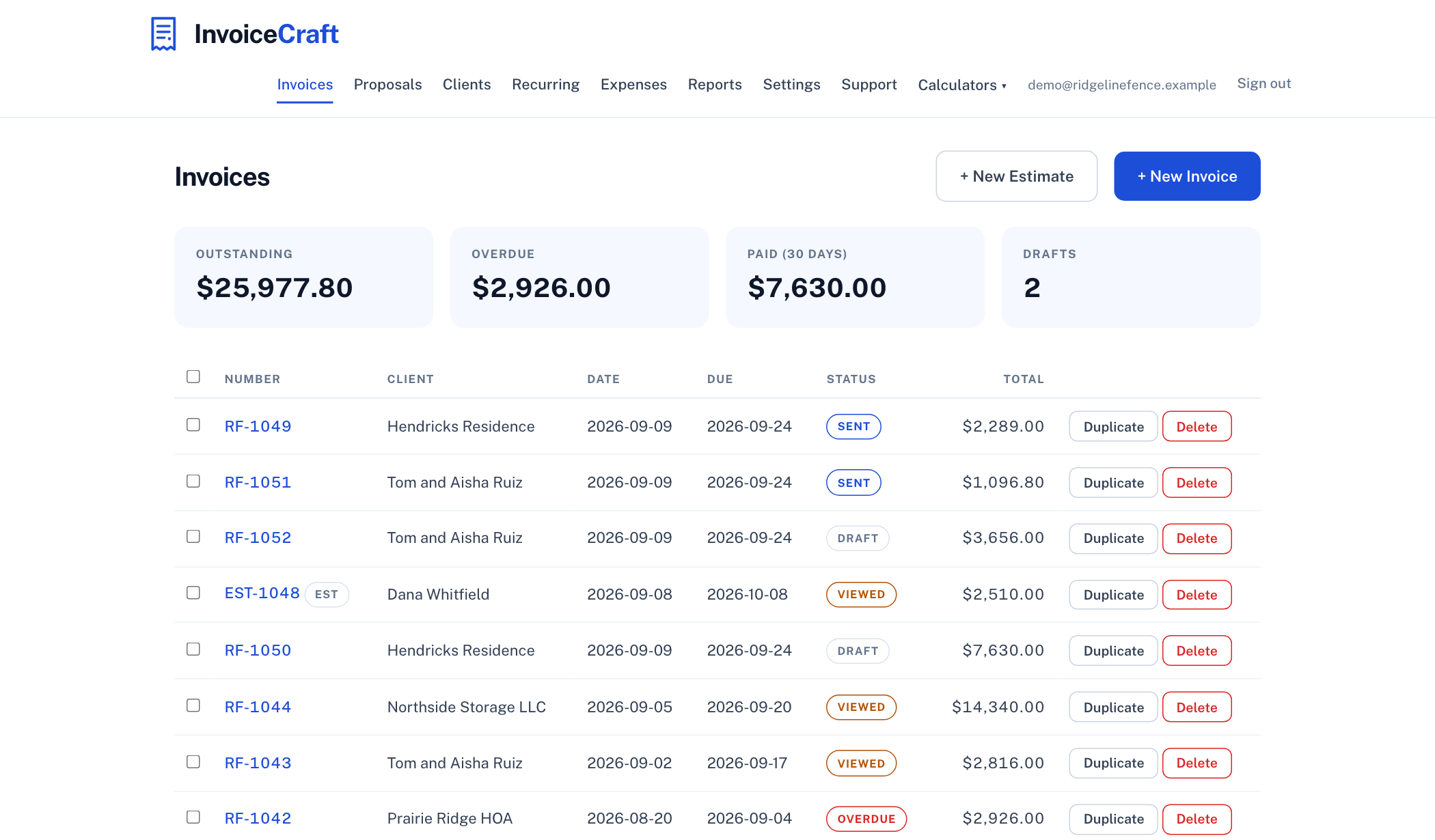
Every invoice, one glance
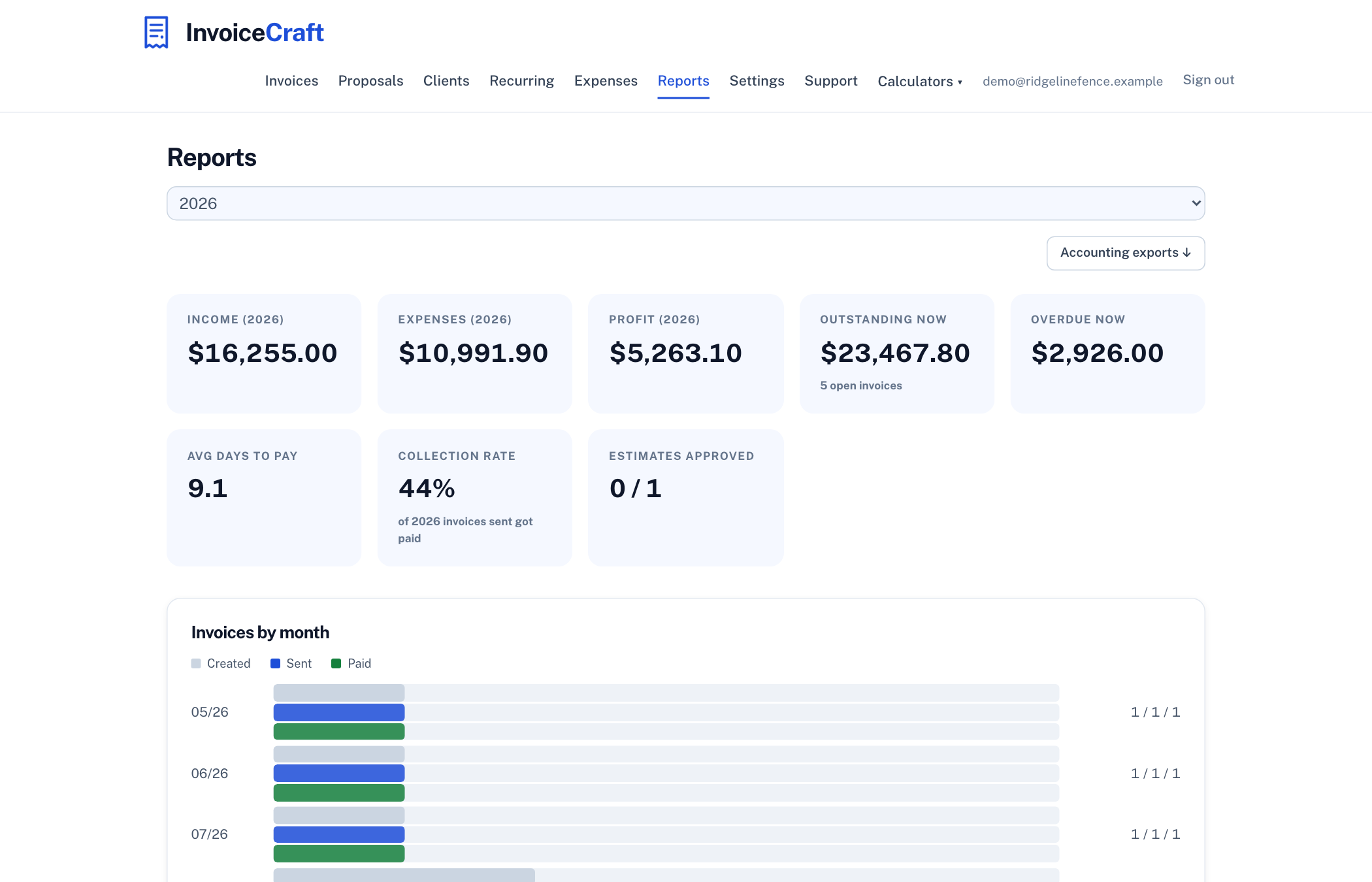
Outstanding, overdue, and paid at the top. Statuses update themselves as clients open and pay, so you always know who to nudge.
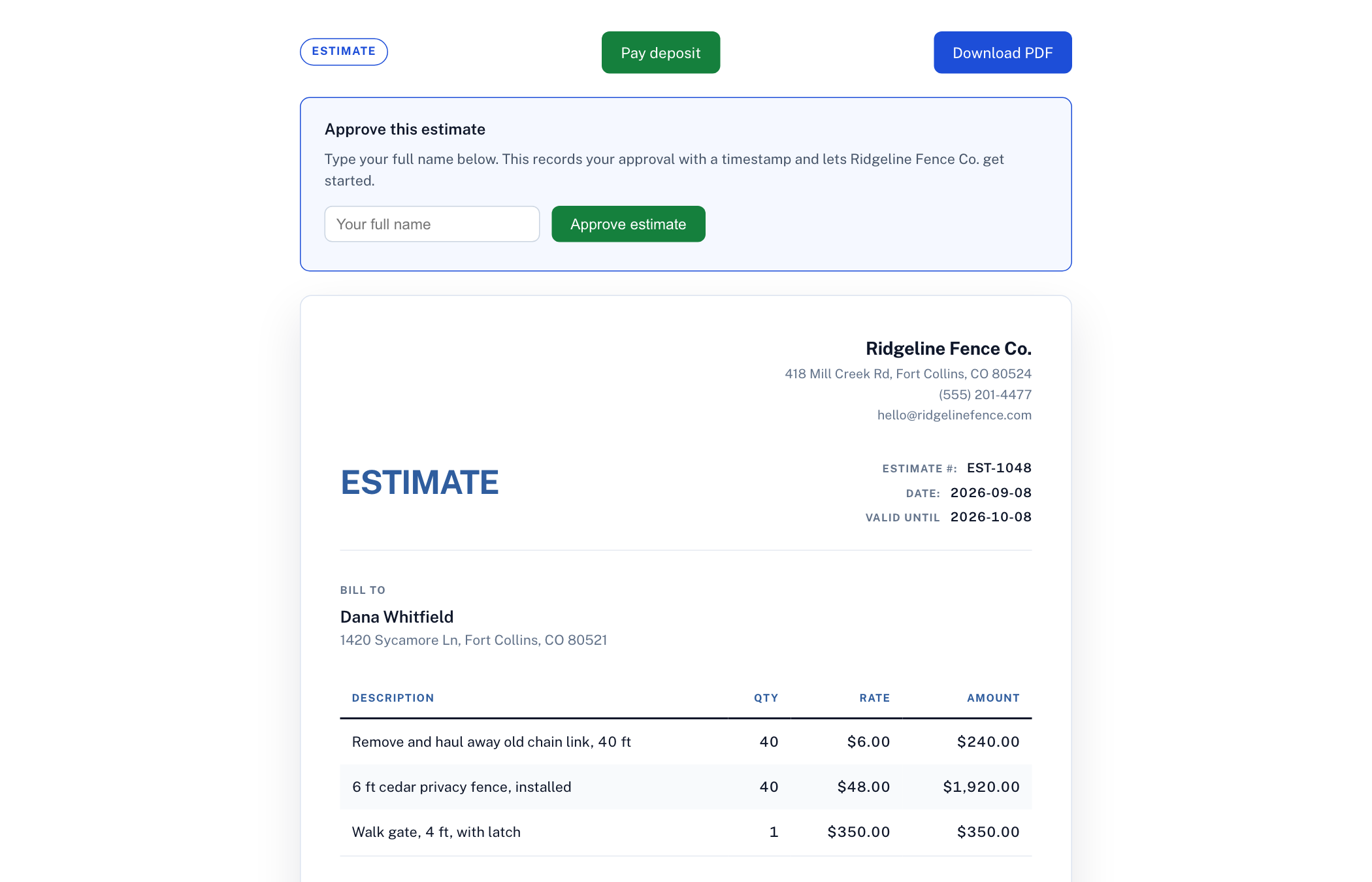
Clients get a link, you get paid
Every invoice and estimate has a clean online page: clients approve estimates with a typed name, pay the deposit or the invoice by card through your own free Stripe link, and download a receipt once they have paid.
Know your numbers
Who owes you and how late they are, how fast you actually get paid, income against expenses, and how much warranty exposure and callback cost you are carrying. Real answers, not a spreadsheet project.
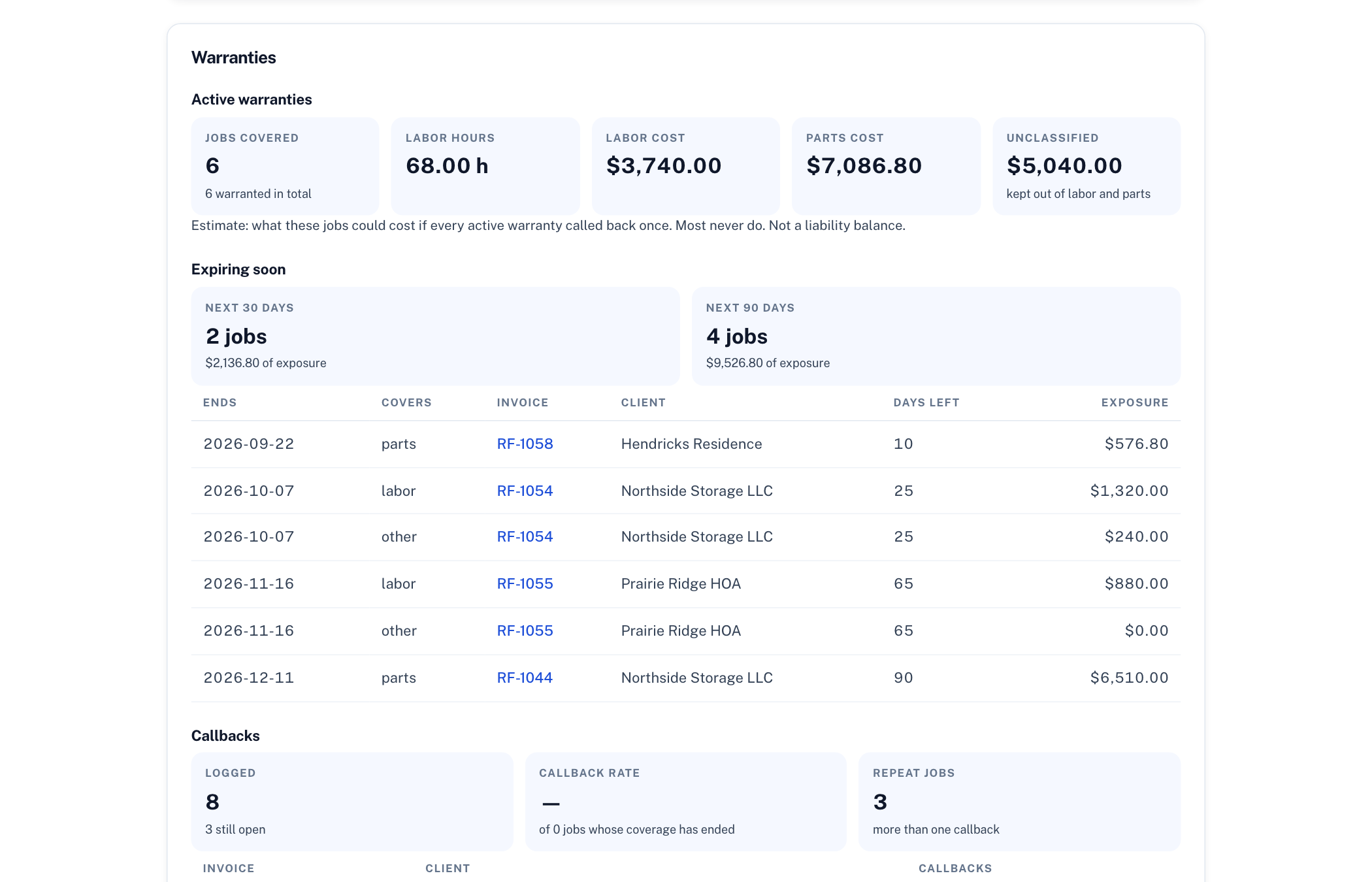
What you still owe on finished jobs
Mark an invoice paid and the warranty starts itself: coverage dates, the labor hours and parts dollars you could be called back for, what expires this month, and every callback logged against the job that caused it. See how warranty tracking works.
How we compare
The three tools people most often weigh us against. Same features on Pro and Team; nothing here is capped by invoice count.
| InvoiceCraft | Wave | Invoice Simple | Zoho Invoice | |
|---|---|---|---|---|
| Free invoices | Unlimited, no signup, no watermark | Unlimited, account required | Trial, then paid | Free with caps and Zoho branding |
| Paid plan | $9/mo, every feature | $19/mo | $6.99 to $21.99/mo, priced by invoice count | Moves you to Zoho Billing, a separate product |
| Team of up to 5 | $15/mo flat, full or view-only seats | Extra users need Pro ($19/mo) | Single account | 2 users free, then Zoho Billing |
| Proposals customers sign | Optional add-ons and typed signature at no extra cost; the invoice is created on acceptance. 3 a month free, unlimited on Pro | Estimates | Estimates | Estimates |
| AI writes the line items | From a plain-English job description, tuned to 25 trades | No | No | No |
| Change orders the customer signs | Signed online with a permanent record; the balance invoice updates itself | No | No | No |
| Warranty tracking | Coverage dates, exposure estimate, and callbacks from paid invoices | No | No | No |
Swipe sideways to see Wave, Invoice Simple, and Zoho Invoice.
Competitor figures from their public pricing pages, checked September 2026. Full comparisons: vs Wave, vs Invoice Simple, vs Zoho Invoice.
Start from your trade
Proposal templates with realistic line items, the add-ons customers actually buy, and terms that hold up.
I built InvoiceCraft because every tool that could get a quote signed wanted $50 a month and a scheduling module I did not need. Invoices are free here and always will be. Proposals cost $9 when you send more than three a month. JT, founder
Start from your industry
Each template loads the editor with AI pricing tuned to your trade.
Document tools
Beyond invoices: the other paperwork a small business sends.
What tradespeople actually charge
Real 2026 rate ranges by trade, plus whether your state taxes labor. Free to read, no signup.
Comparing tools? See InvoiceCraft vs Wave, vs Zoho Invoice, and vs Invoice Simple.
Frequently asked questions
Is the invoice generator really free?
Yes. Creating and downloading invoices is free with no account, no watermarks, and no limit on how many you make. Pro ($9/month) is for unlimited proposals with e-signature, deposits, and branding, plus the account tools: saved invoices, sending, tracking, reminders, and recurring billing.
What does Pro add?
Unlimited proposals customers accept online with a typed signature, deposits invoiced automatically on acceptance, and your logo and colours on every document. Plus an account where invoices and clients are saved, one-click email sending with read receipts, automatic overdue reminders, receipts sent when invoices are paid, estimates that convert to invoices, recurring billing, part payments with the balance due tracked on every document, reminders before and after the due date, bank deposits matched to invoices from a CSV, a quarterly or year-end tax package, expense tracking, and reports. $9/month for one login, or $15/month for a team of up to five, with a 14-day free trial.
Does it track warranties?
Yes, on Pro and Team. Mark an invoice paid and your workmanship warranty terms are attached, the coverage dates are worked out, and the labor and parts still under cover are estimated from that invoice's own line items. The terms print on invoices, estimates, proposals, and receipts; callbacks are logged against the original job; and Reports shows active coverage, what expires in 30 and 90 days, your callback rate, and what callbacks cost as a share of revenue. Details at invoicecraft.net/warranty-tracking.
Is my data private?
The free generator keeps your details in your browser. Invoice contents touch our server only for the moment it takes to render your PDF and aren't stored; we keep basic usage records (country, total, item count, and the requesting IP address for 90 days to prevent abuse), never the invoice itself. With a Pro account, your invoices and clients are stored securely so you can access them anywhere, and they're never sold or used for anything except running the product. Full details at invoicecraft.net/privacy.
Can I use it for my industry?
Yes. There are templates with AI pricing tuned for plumbers, electricians, HVAC, cleaning, landscaping, painting, roofing, handymen, auto repair, and freelancers, plus 15 more trades and professions from web design to trucking. The generic editor works for any business.
What format do invoices download in?
Print-ready PDF, with your business details and logo, and no InvoiceCraft watermark or branding. It looks like your invoice, because it is.
Can I try it without signing up?
Yes. The live demo opens a working account for a sample plumbing company, with customers, invoices, proposals and payments already in it. Send a proposal and sign it as the customer, record a payment, or send a change order. Nothing is emailed to anyone, and the demo resets itself after 24 hours. If you like it, keep the account and it becomes your free trial.
Can I break a price down into parts and labor?
Yes. Any line on an invoice, estimate or proposal can carry sub-items, for example a $1,850 water heater install made of the $1,200 heater and $650 of labor. The line total is always the sum. Save the breakdown on your price list and it drops into the next job in one click, where you can change it for that job. You choose whether the customer sees the sub-item prices.
Send your first proposal today
14 days free, no card. Then $9/month for Pro, or stay on the free plan with unlimited invoices and 3 proposals a month.